Rilis 19 September iOS 13
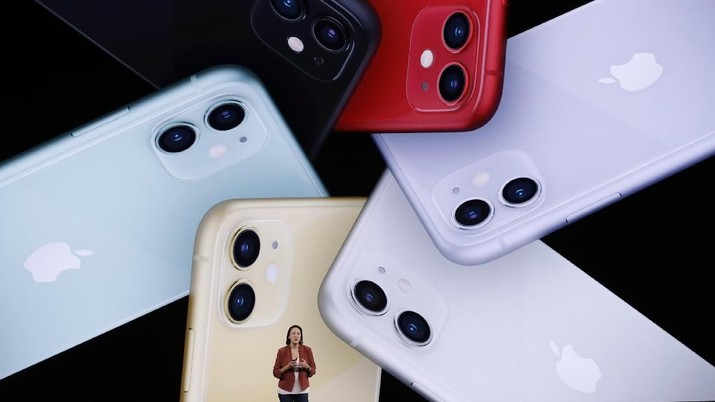
iPhone 11 menjadi bintang dalam acara tahunan Apple yang berlangsung di kantor pusatnya 10 September 2019. Namun ada satu yang terlupa soal tanggal peluncuran operating system (OS) iOS 13.
Dalam acara itu iOS 13 memang tidak diumumkan tetapi tanggal peluncurannya diumumkan pada website perusahaan. iOS 13 akan dikirimkan ke iPhone tanggal 19 September. WatchOS6 dikirimkan 19 September dan iPadOS akan dikirimkan pada 30 September 2019.
Berikut daftar perangkat iPhone yang mendapatkan iOS 13:
iPhone 11
iPhone 11 Pro
iPhone 11 Pro Max
iPhone XS
iPhone XS Max
iPhone XR
iPhone X
iPhone 8
iPhone 8 Plus
iPhone 7
iPhone 7 Plus
iPhone 6s
iPhone 6s Plus
iPhone SE
iPod touch (7th generation)
Apple akan mengirimkan pembaruan iOS lewat metode OTA (over-the-air). Berikut cara updatenya:
Buka Settings
Pilih General
Masuk ke Software Update
Tekan tombol Download and Install
Apple Inc mengumumkan pembaruan sistem operasi ponsel iPhone, iOS 13, pada perhelatan Worldwide Developers Conference, Senin (3/6/2019).
Dengan sistem operasi baru ini, para pengguna akan dapat membuka kunci gawai (gadget) dengan FaceID lebih cepat 30%. Kecepatan akses aplikasi juga akan naik hingga dua kali lipat di sistem baru tersebut.
Sistem operasi ini mendapat perombakan desain dengan dilengkapi mode gelap atau dark mode yang memberi latar belakang gelap untuk sistem menu dan aplikasi, dilansir dari CNBC International.
Media is one of the best online advertising program in the world besides google adsense. Yllix Media provides advertiser services and advertisements that look professional.
This site offers income through blog with 3 ways that is through program of CPM, CPC and CPA which made in one. If the blog agan have a pretty good traffic gedhe kagak no harm trying this site. The list is easy and direct approve. Can also put an ad on the spot. Not bad can be used as an alternative income other than google adsense.
Media can be said to be unique. Why ? because the also advertise on adult blogs. Because the program provides adult and non-adult ad slots. For payment can be done daily at least $ 1 and can also disetting your liking.
Tutorial sign up to be an ad publisher:
HERE or banner below
2. Fill in your valid name and email
3. Open your Email, note the id and password that have been sent the Yllix then click the activation link, and follow the steps next step.
Payment Support = Payza, Paypal, Liberty RS, Bank Wire
Payout once every 1 week
Yllix advertise so much from reputable websites like Google, Yahoo, eBay, Amazon, Apple, BMW, Coca-Cola, Adidas, Citibank, Visa and more.
Guide to getting the ad code:
Click "Sites" if you want to add a website or blog
Click "Ad Tags" to start generating ad code
On banner Tag: Rating (Choose Non-Adult), Format (Select Banner Size), Display Layer Ads (Select No) then click "Get Ad Tag" button and copy and save the code.
Paste the ad code in Dashboard> Advertising> Desktop Advertising Settings
Ad formats: 468 × 60 horizontally, 160 × 600 vertical, 300 × 250 squares, for mywapblog in suggest choose size less than 500 x 300
UPDATE: There’s a summer promo that you should take advantage right now! If you sign up BEFORE July 15th 2017 and start earning with Revenuehits you will receive a extra bonus. Here are the terms:
A new Publisher who will – sign-up to RevenueHits.com, use the platform for a period of 1 month and reach at least 1000 USD in Revenues – will be rewarded with 100 USD Sign-Up Bonus;
A new Publisher who will – sign-up to RevenueHits.com, use the platform for a period of 2 month and reach at least 3000 USD in Revenues – will be rewarded with 300 USD Sign-Up Bonus;
A new Publisher who will – sign-up to RevenueHits.com, use the platform for a period of 3 month and reach at least 5500 USD in Revenues – will be rewarded with 900 USD Sign-Up Bonus.
Publisher who decides to claim his Sign-Up Bonus after 1 month/2 months, will not be eligible for any additional rewards for the use of the RevenueHits platform in the following months.
In order to claim the Sign-Up Bonus, the Publisher must submit a cash-out request to RevenueHits (via – support@revenuehits.com).
Today I’d like to introduce you to one of my favorite ad networks. One I’ve been using (and many friends and readers) to earn $1,000 per month with several websites. This network is called RevenueHits and until last year I had no idea about them until they approached me to talk business.
RevenueHits Review
As mentioned above, a manager from the Publishers area approached to me via LinkedIn or Skype (can’t remember) and we talked how we could do some business by running and testing their ads against other, including the famous Google Adsense. At first I was hesitant, I must say, but I like to give a try to different networks because you never now when you’re going to find a golden nugget and boost your earnings.
$2,230 with RevenueHits?
Last month we pulled over $2,000 from RevenueHits and other similar networks. Learn how you can make it too.
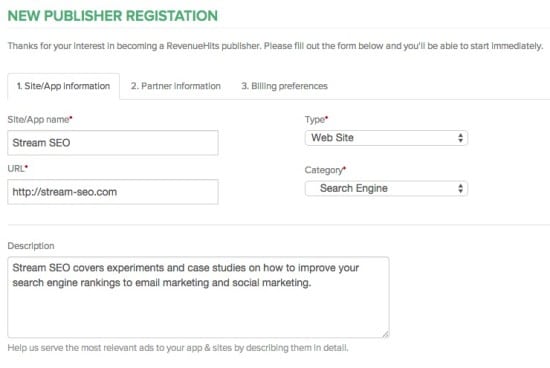
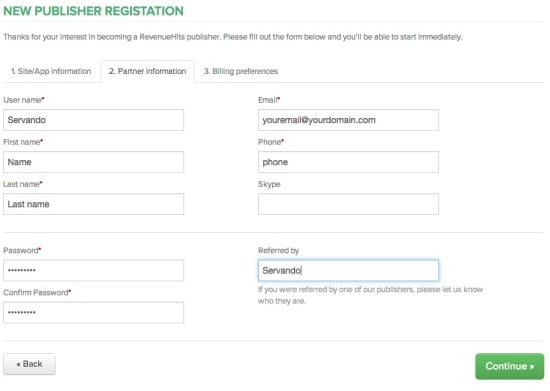
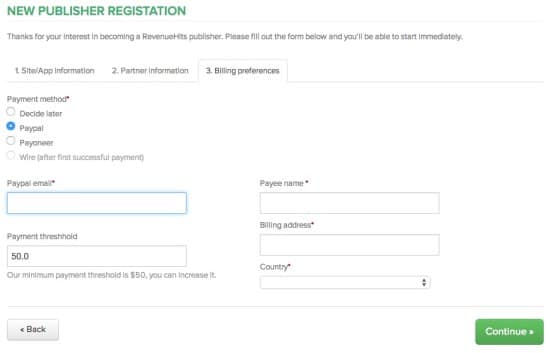
In fact, revenue hits has worked well for me and hundreds of my readers that it has earned a spot in my Google Adsense alternatives list. I know it works for me and I know it works for my readers cause they give me feedback and because their referral program gives you stats to give you an idea of how it’s working for others too. RevenueHits is owned and operated by MyAdWise Ltd – a privately-held, Israeli-based, start-up company founded in 2008 by a team of experienced tech professionals, finance experts and successful online marketers. If you want to sign up as a publisher with Revenue Hits just click here or click the image above to get started. You’ll need to fill up your data including your website or mobile app, URL, category and a brief description to get accepted. I’m glad they have an immediate approval system so anyone will be accepted and processed really fast. After that just fill in your personal data including name, phone and password and click continue. Finally, you’ll decide how you’re getting paid. They have Paypal, Payoneer or Wire transfers and the payment threshold can be as low as $20 if you’re using Paypal. They pay on a NET30 basis.
Revenue Hits Dashboard – Campaign Setup
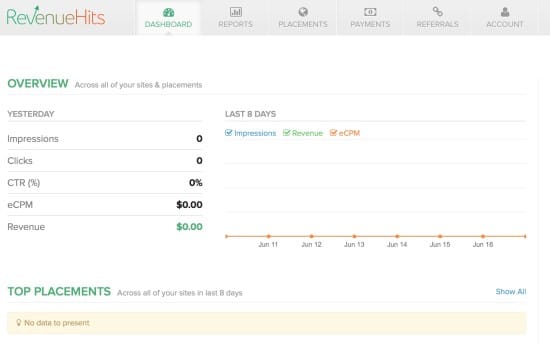
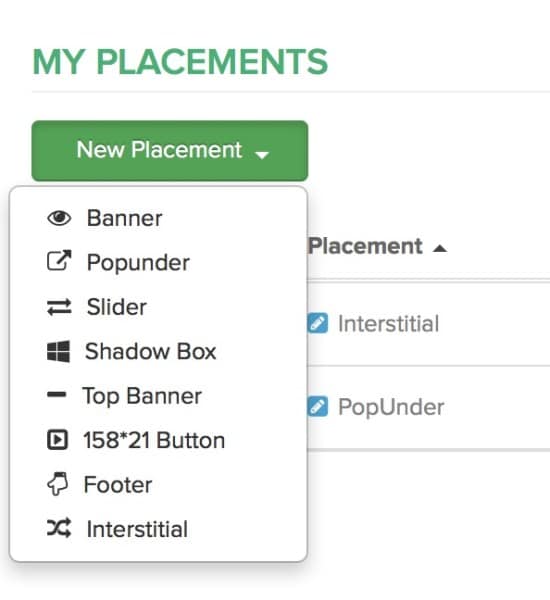
Once you’re inside you’ll find a very good looking dashboard with a nice user interface. That’s something I appreciate in every network because some alternatives look like they were designed back in 1990-2000. Here you’ll find your stats including impressions, clicks, eCPM and Revenue from the last 8 days. I created a new empty account just to show you the whole process but this should show all of your data according to the websites you add in the future. First, you need to add a website (URL and name) and then select a new placement to add. A placement is an ad designed to be someplace in your website. They have several type of ads including:
Banners
PopUnders (my favorites)
Slider
Shadow Box
Top Banner
158*21 Button
Footer
Interstitial (my second favorite)
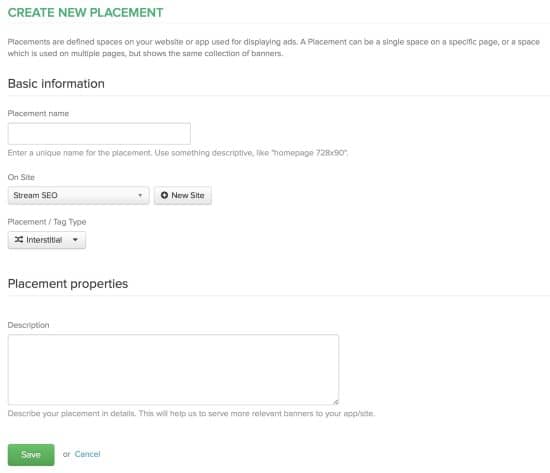
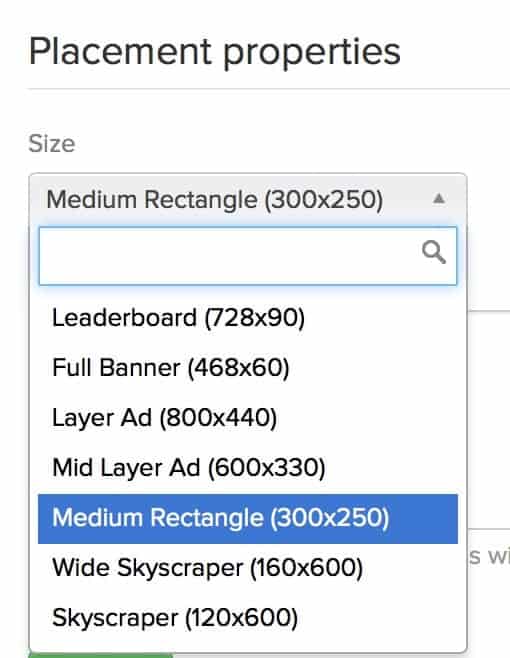
PopUnders and Interstitials have worked great for me with several networks because the click rate can be really high and you don’t need to get clicks in your banners to earn money. I’ve seen RevenueHits rates going from $0.5 CPM and up to $30 or more per CPM. If course this all depends on the country and type of traffic you’re receiving. The results won’t be the same if you’re getting Mac OS X traffic from Venezuela as they could be if you receive Android traffic from the UK for example. Once you’ve selected the type of ads you want to use, you just need to fill up the basic information including a name, the website you’re going to put your ad and a description. If you select a banner ad, you’ll find another dropdown menu (see below) with different sizes similar to what you’ll get with Google Adsense. I’ve never found banner ads to be really good with any pop traffic network, but make sure you give them a try before ditching them off completely. My recommendation is to use popunders and interstitials first though.
Revenue Hits vs. Adsense
It’s difficult to compare Revenue Hits against Adsense because RevenueHits is a great network for pop unders and not banners like Adsense, but I’ve been able to generate a lot more money from RevenueHits and their CPA model compared to Adsense, especially in niches for the leads or conversions pay better than anything else. I’ve seen eCPMs up to $50-100 with RevenueHits too. Especially if you’ve got mobile traffic then those interstitial Ads will have a great impact in your Revenue. Some verticals I recommend you to try with Revenue Hits are:
Mobile
Shopping
Dating
Coupons
Travel
Entertainment
Gaming
Software
Bitcoin
Free Download
Dollar
Pedofile
and more…
RevenueHits payment
I’ve been working with RevenueHits for several months already. While they just revamped their whole platform a few months ago, I started to make $200 the first months and it quickly grew to $600-$1,000 per month. The new interface shows everything in a better way (they revamped everything in January-February 2015) and as you can see, I’ve been hitting more than $1,000 in the last months.
RevenueHits payment proof
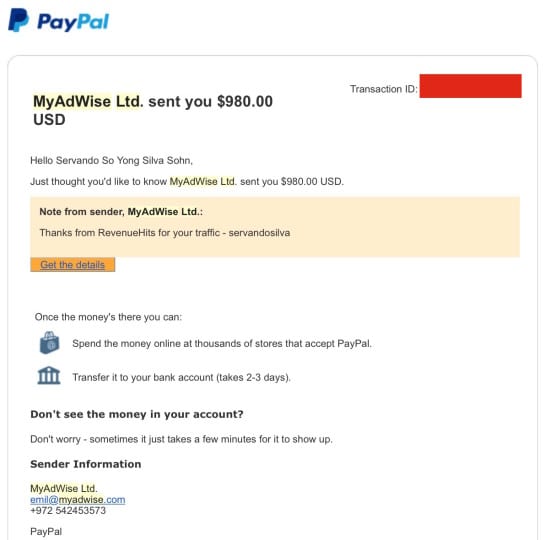
I love receiving payments via Paypal so here’s one of the latest payments received under MyAdWise Ltd. Remember they pay on a NET30 basis, so what you earn this month gets paid at the end of the next month. RevenueHits has never failed to pay me on time and I’ve received around 6-7 payments already.
RevenueHits Review – Conclusion
Honestly, RevenueHits is one of the best networks I’ve worked with and their performance and their support has been outstanding so far. Their managers are always in contact and they will help you optimize your ads to get the most revenue out of it. If you don’t like an ad you see in your website, let your manager know and he’ll help you out. Aside from it, remember to test different ad formats and keep them running for at least a week so they can optimize your earnings with time. My favorite ads are popunders and interstitials, but you can always try the rest and see what works for you. As for payments, don’t worry. They’ll pay on time as long as you reach their $20 threshold at the end of the month. You can’t go wrong with them, honestly, and that’s why they’ve been at the top of my ad networks list for several months already. No network would be on top unless my readers and me are getting great results both. And who knows, you could claim a nice gift from their summer contest if you act fast. So what are you waiting for?! Sign up here as a publisher and I’ll talk to you on the next one.
TubeMate YouTube Downloader is an app to download videos from Youtube directly onto your mobile phone, thanks to which you can have all your favorite videos saved within your SD card memory and watch whenever you want.
Using this app is as simple as accessing the video of interest through the 'browser' that comes integrated within the app itself. From there, simply press the green arrow located at the bottom of the screen.
At that moment you can choose what quality you want to download your video in, normally having many different resolution options adapted to the various terminals Android compatible with this app. Depending on the download format you choose, you might need an extra app to play your files.
The downloaded videos by default are sent your storage card, but you can easily move them at your whim if you'd prefer to store them in separate places. TubeMate YouTube Downloader is a very easy to use video downloader tool whose main trick is precisely that: you can download any video in seconds.
Blackmart Alpha is a market alternative to the Google Play Store for tablets and smartphones with Android operating system, from Blackmart you can download many applications, without the need to have an account and Google without the need for any kind of registration.
Blackmart Alpha: Functions
This market is very simple to use and offers many features to be able to download many applications.
On this market all applications are available for free download on the market Blackmart there is no application “trial” or “test”, there are only complete applications and free.
The Google Play Store is a very comprehensive market offers a number of applications, but unfortunately on Google Play Store, there are many paid apps and some are not often available for download on select smartphones or tablets even though they might be compatible.
On Blackmart this problem is not there, just download the application and try it, there are no limitations.
Its market is very intuitive and has functions for the custom search application.
Blackmart Alpha Download
To make the downloads Blackmart click the Download Blackmart link located under:
Do you use Windows and you need to take a screenshot quickly? Do you have trouble with the PrtScn key not working? Do you want to take a screenshot of the active window instead of the whole screen? Or maybe you want to take a free-form screenshot of a particular area of the screen? Or maybe you are playing a game in Windows, and you want to capture your achievements with a screenshot? It doesn’t matter why you want to take a screenshot; this guide has you covered:
NOTE: This guide applies to ALL modern versions of Windows: Windows 10, Windows 7 and Windows 8.1. Some of the methods described in our tutorial, work only in one or two of these operating systems. Where that is the case, we appropriately highlight this fact.
1. Use the keyboard shortcut: PrtScn (Print Screen) or CTRL+ PrtScn
The first method is also the best known and it works in all versions of Windows: on your keyboard, press the PrtScn (Print Screen) key or CTRL+PrtScn keys. Windows creates a screenshot of the whole screen and saves it to the clipboard. It is not stored as a file on your hard drive. Then, open an image editing program like Paint and paste the picture from the clipboard. Then, you can save it as a file and even do some basic editing.
2. Use the keyboard shortcut: Windows + PrtScn
If you want to take a screenshot of the whole screen and save it as a file on the hard drive, without using any other tools, then press Windows + PrtScn on your keyboard. Windows stores the screenshot in the Pictures library, in the Screenshots folder. The file is named “Screeenshot(number).png,” where the number will vary based on how many screenshots you have taken. In Windows 10, you can also find your screenshots if you use the Photos app, by going to “Folders -> Pictures -> Screenshots.”
3. Use the keyboard shortcut: Alt + PrtScn
In Windows, you can also take screenshots of the active window. Open the window that you want to capture and press Alt + PrtScn on your keyboard. The screenshot is saved to the clipboard. Open Paint or any other photo editing software and paste the image so that you can edit it and save it to your Windows computer or device.
If you have a laptop, a tablet or a keyboard with the Fn key, do this instead of the first three methods:
The first three methods should work perfectly well on desktop computers with Windows or on Windows devices with a standard keyboard. However, if you have a laptop or a convertible device with a Fn key, then the PrtScn key will do other things too, not just take screenshots. Therefore, when you press the PrtScn key, it will not take a screenshot. Instead, use one of the following keyboard shortcuts:
Fn + PrtScn - makes a screenshot of the whole screen and copies it to the clipboard. It is the equivalent of pressing the standard PrtScn key.
Fn + Windows + PrtScn - takes a screenshot of the whole screen and saves it as a file on the hard drive, without using any other tools. Windows stores the screenshot in the Pictures library, in the Screenshots folder. It is the same as pressing Windows + PrtScn on a standard keyboard.
Fn + Alt + PrtScn - takes a screenshot of the active window. It is the equivalent of pressing Alt + PrtScn on a standard keyboard.
On some keyboards, the PrtScn button might not perform two or more actions. However, it won’t work until you press Fn lock key. On such keyboards, the Fn key works as a lock for the function and multimedia keys on the top, including the Print Screen key. If you have such a keyboard, press the Fn key to unlock the top row of keys and then use the shortcuts we described in the first three sections of this article. They should work now. If you have a Surface or Surface Pro tablet from Microsoft with Windows 10, you need to use completely different keyboard shortcuts, because there is no PrtScn key on the Type Cover. Instead, Microsoft offers the following Surface-device specific shortcuts for Windows 10:
Fn + Spacebar - saves an image of your current screen to the clipboard, so that you can paste it into any application. It is the equivalent of pressing the standard PrtScn key.
Fn + Alt + Spacebar - saves a screenshot of the active window, to the clipboard, so that you can paste it into any application. It is the equivalent of pressing the Alt + PrtScn keyboard shortcut.
4. Use the keyboard shortcut: Windows + Shift + S (Windows 10 only)
If you use Windows 10, press Windows + Shift + S to capture a region of your screen and copy it to your clipboard. After you press Windows + Shift + S, the screen is dimmed, and a cursor is shown, that you can use to draw on the screen the region that you want to capture in a screenshot. Draw the area that you want to capture and release the mouse cursor. The screenshot is saved to the clipboard. Open Paint or any other photo editing app and paste the screenshot so that you can edit it and save it. This feature was originally part of OneNote 2016 but has been added to Windows 10 itself, which is great.
5. Use the Snipping Tool
The Snipping Tool is a great desktop app for taking screenshots. It can create all kinds of screenshots, and you can also use it to do some light editing. Search for the words “snipping tool” in the Start Menu search box (if you use Windows 10 or Windows 7) or on the Start screen (if you use Windows 8.1) and click or tap on the appropriate search result.
6. Take screenshots on a Surface tablet or any other Windows tablet
If you have a Windows tablet, like a Microsoft Surface or an ASUS Vivotab or a Dell Venue, then you won't have a keyboard with a PrtScn key available. Yes, you can use the Snipping Tool, but that's not great on a device with touch. The best solution is to use the hardware buttons available on your tablet. On most (if not all) Windows tablets, you can take full-screen screenshots by pressing the Windows logo and the Volume Down key at the same time.
You will see the screen getting darker when you do this. This signals that a screenshot was made. You will find the screenshot in your Pictures library, in the Screenshots folder.
7. Take screenshots with the Share charm (Windows 8.1 only)
8. Use the keyboard shortcut: Windows + Alt + PrtScn (Windows 10 Creators Update only)
In Windows 10 Creators Update, Microsoft has introduced new features for gamers, including a new Game Bar that can be used when playing games of all kinds. One of the things you can do with this Game Bar is take screenshots of the active game window. While playing a game, press the keys Windows + Alt + PrtScn, and a screenshot is automatically created and stored on your Windows 10 computer or device.